Watch Duty: Wildfire & Floods
- 4.8
- Rating
- 1.00M
- Installs
- Free
- Price

 Analysis by App-foxy
When wildfire information is scattered across television reports, social posts, official notices, and messages from neighbors, it is difficult to know what deserves your attention first. I found Watch Duty useful because it puts wildfire maps and alerts at the center of the experience instead of making me search through several unrelated sources. It is a free communication app from Watch Duty, rated for Everyone, and its focus is simple: help people follow active fire situations in a more organized way.
I would not treat it as a replacement for emergency services or local evacuation instructions. I see it as an awareness tool that can help me notice a developing situation, understand where it is on a map, and decide when I need to check official guidance more closely. That distinction matters. An alert can improve my awareness, but it cannot tell me everything about road closures, shelter capacity, air quality, or the safety of a specific building.
How Watch Duty fits into a normal wildfire routine
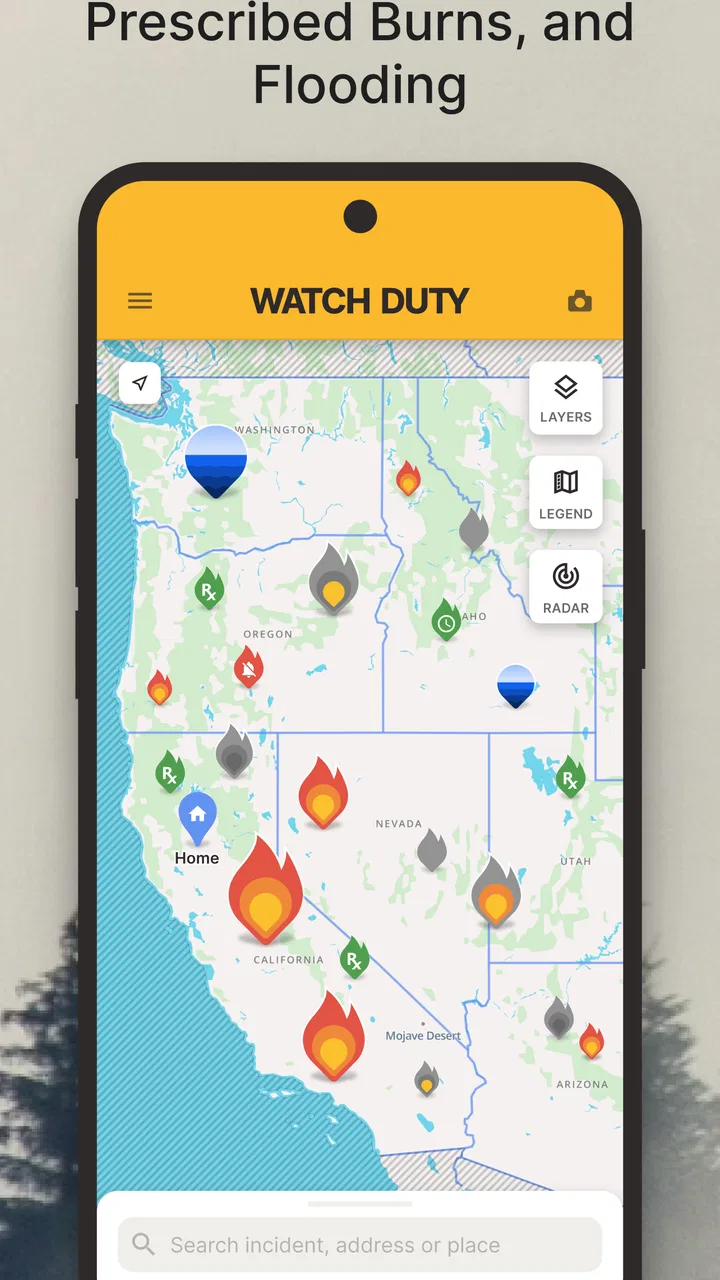
My basic workflow starts before there is an emergency. I open the map occasionally, look at the area around home and the places I visit regularly, and make sure I understand the nearby roads and landmarks. That small amount of preparation makes an alert much more useful later. If I only install the app during a fast-moving fire, I am still learning where everything is while trying to make an important decision.
You May Also Like

 Google Keep - Notes and lists
Google Keep’s Quiet Growth Shows the Appeal of Simpler Notes
As mobile work gets busier, Google Keep keeps winning a simple contest: capture a thought quickly, find it later, and get on with the day.

 Blood Strike: 2.5 Anniversary
Blood Strike’s Loadouts Turn Every Drop Into a Tactical Gamble
A close look at Blood Strike’s custom loadouts: how fast access to signature weapons reshapes its battle royale rhythm, rewards preparation, and narrows the gap between fights.

 Pandora - Music & Podcasts
Pandora’s Music Is Easy to Start, but Harder to Recover
Pandora’s strength is its low-effort path from a seed to a station. Its weak spot is how much confidence it asks you to place in connection, setup, and quiet recovery.

 8 Ball Pool
 Is Built on Rivalries, Rematches, and Routine
A close look at the rivalries, rematches, shared routines, and unanswered safety questions that turn a quick pool match into a persistent mobile community.

 Samsung Music
’s Quiet Strength Is Playing What You Already Own
Its reach comes less from spectacle than from dependable access to a personal library. That simplicity is both the app’s strongest retention engine and its ceiling.

 AccuWeather: Weather Radar
AccuWeather Review: A Quick, Clear Forecast for Everyday Decisions
For everyday plans, the best forecast is the one you can understand quickly. AccuWeather makes rain timing, radar, and local conditions easy to act on, with a few trade-offs.
More From Our News Desk



The map is the main reason I would choose this app over a general news application. News coverage may explain the broader story, but a map gives me a spatial reference. I can think in terms of distance, direction, and familiar places rather than trying to interpret a vague headline. The practical benefit is not that the map makes a decision for me; it gives me a better starting point for asking the right questions.
For example, imagine I am working from home and receive an alert about a fire in the wider area. Instead of immediately forwarding it to everyone I know, I would open the map, check whether the incident is near my usual routes, and compare that information with local instructions. If a family member is driving nearby, I can tell them to check their route and official notices rather than relying on my interpretation alone. This is a calmer and safer use of the app than treating every notification as a reason to panic.
The app’s communication category is a good fit because its value depends on timely awareness and sharing information responsibly. I can use it as a first look, then move to local authorities for instructions that affect my exact address. That two-step habit is more reliable than expecting one application to cover every part of an emergency.
Watch Duty has been available since early August of 2021, so it is not a brand-new experiment that appeared only because of one recent fire season. Its current version is 2026.5.29, and it is available for devices running operating system version 10 or later. I would still check compatibility before installing it on an older phone, especially if that phone is the one I keep for emergencies.
What I would do immediately after installing it
First, I would allow myself time to understand the map without an active incident demanding attention. I would look for the controls that affect the visible area and notifications, then test how quickly I can return to my local region. This is one of the less obvious advantages of preparation: under stress, familiar gestures and screens are worth more than a long list of features I have never practiced.
Second, I would decide which places deserve my attention. That could include home, a workplace, a child’s school, an older relative’s home, or a regular weekend destination. I would avoid turning every possible location into an alert source if doing so makes notifications noisy. A phone that constantly reports distant incidents can train me to ignore the one notification that actually matters.
Third, I would keep a separate habit of checking official emergency instructions. Watch Duty can help me notice a wildfire and understand its general location, but evacuation orders and emergency directions should come from the responsible local authorities. I would also keep in mind that conditions can change between the moment an alert appears and the moment I read it.
The most useful mindset is to use Watch Duty as an early-warning and orientation layer, not as a complete emergency plan. That single distinction prevents two common mistakes: dismissing a helpful alert because it is not a full official notice, or acting on a map view without checking the instructions that apply to the affected area.
Settings I would check before relying on alerts
Notifications deserve more attention than they usually receive. I would review which alerts are enabled, how they appear on my phone, and whether the operating system is allowed to deliver them promptly. A wildfire app is only helpful if the phone can actually notify me when I am not looking at the screen. I would also check the device’s general notification and battery settings, since aggressive battery-saving behavior can interfere with time-sensitive apps.
I would keep the sound and vibration behavior appropriate for my routine. Someone who works in meetings may need a noticeable but less disruptive alert pattern, while someone caring for a vulnerable family member may prefer the strongest practical notification setting. The important point is to choose deliberately instead of accepting the default and assuming it suits every situation.
Location-related choices are also worth reviewing. If I want information relevant to where I am, the app needs enough location access to provide that context, but I would still read the system permission screen carefully and choose the option that matches how I intend to use it. If I mostly monitor a fixed home area, I may prefer a more limited approach than someone who travels through fire-prone regions every day.
I would not confuse a map centered on my current position with an automatic safety assessment. A phone can show where I am, but it cannot know whether my building is defensible, whether smoke is affecting my breathing, or whether a road is safe to use. Those decisions require local information and personal judgment. The app can reduce the time spent locating an incident; it cannot remove the need to think.
Another setting-related habit is keeping the app updated. The current release is identified as 2026.5.29, and using the current version is sensible for an app whose usefulness depends on timely information and dependable behavior. I would update before wildfire season rather than waiting until an emergency is already unfolding. If storage or automatic updates are a concern, I would at least make app maintenance part of my preparedness checklist.
Because the app is free, there is little financial friction in keeping it installed as a backup source of awareness. That does not mean I would install every emergency application available. Too many overlapping tools can create contradictory notifications and confusion. I would rather have a small, understandable system: Watch Duty for wildfire awareness, official local channels for instructions, and a personal plan for family communication and evacuation.
Faster patterns for everyday use
Experienced use is less about opening the app repeatedly and more about building a repeatable routine. I would check the map at sensible intervals during periods of elevated fire risk, then close it and continue my day. Constant refreshing can create anxiety without improving decisions. A scheduled glance is often more useful than watching the screen continuously.
I would also learn the quickest path from an alert to a useful question. When a notification arrives, I would ask: where is the incident, is it near a place that matters to me, and what official instruction applies? If the answer to the second question is no, I may only need to stay aware. If the answer is yes, I would stop treating the alert as casual news and verify the situation through local emergency information.
One practical shortcut is to keep a small written list of important addresses and alternate routes outside the app. That list helps when I need to compare the map with real plans, and it remains available if my phone battery is low or connectivity becomes unreliable. Watch Duty is more useful when it works alongside preparation rather than carrying the whole burden of preparation itself.
I would use the sharing function of my phone carefully. If a relative asks whether a fire is nearby, I would send the relevant information with the time I checked it and encourage them to consult official instructions. Passing along an old screenshot without context can be misleading because a wildfire situation may change quickly. A short message that explains what I saw and what still needs verification is more responsible than forwarding a dramatic image.
Another helpful pattern is separating observation from action. The app may show me that an incident exists, but I should not automatically leave home, change a route, or tell someone else to evacuate based only on that first notification. I would use the map to orient myself, then look for the instruction that applies to my location. This reduces both complacency and overreaction.
For families, I would agree on what an alert means before one arrives. Does a notification trigger a group message, a check-in, or simply a review of official sources? Establishing that rule in advance avoids five people interpreting the same alert differently. Watch Duty can start the conversation, but the family plan determines what happens next.
Where the app is strong and where its limits matter
The clearest strength is focus. A general weather application may show wind or heat, and a social network may contain eyewitness posts, but neither is designed around wildfire awareness in the same way. News apps are useful for context, yet their coverage can be broad and slower to become personally relevant. Watch Duty gives me a more direct way to look at fire activity on a map, which is especially valuable when the place name in a headline is unfamiliar.
That focus also creates a limitation: I would not use it as my only source during an emergency. A map can help me understand the reported location, but it may not answer the questions that matter most to a particular household. I still need official evacuation information, route guidance, and instructions from local emergency organizations. People who want one app to manage every safety concern will probably find this narrow focus frustrating.
I would also be cautious about interpreting boundaries or visual markers too literally. Maps are excellent for orientation, but a visible shape is not a guarantee that conditions stop at its edge. Wind, smoke, embers, road access, and local terrain can make a situation more complicated than a screen suggests. The app is best used to improve awareness, not to create a false sense of precision.
Connectivity and battery life are practical concerns for any emergency communication tool. If I am traveling, I would not assume that the app alone will remain fully useful in every location or condition. Before heading into a remote area, I would charge my phone, tell someone where I am going, and learn the local emergency channels. The application can be part of that preparation, but it cannot solve a weak signal or an empty battery.
Some users may also find alerts stressful, particularly if they live in a region with frequent fire activity. In that case, the answer is not necessarily to uninstall the app. I would first refine the notification choices and decide which locations genuinely matter. If the alert stream still makes it difficult to distinguish urgent information from background activity, a simpler official alert setup may be a better fit for that person.
Who should install it, and who may prefer another option
I think Watch Duty is a strong choice for people who live in areas where wildfires are a recurring concern, travel through those areas, or have family members there. It is also useful for anyone who wants a map-based view instead of relying entirely on headlines. The fact that it is free makes it easy to keep available without making it a major commitment, and its Everyone content rating makes it suitable for a broad household audience.
I would recommend it particularly to people who are willing to combine tools. The best experience comes from using the app for awareness, official sources for instructions, and a personal plan for transport, medication, pets, documents, and family contact. Someone who follows that layered approach will get more value from the map and alerts than someone expecting a single tap to provide a complete answer.
I would be less enthusiastic for a user who lives far from wildfire risk and has no reason to monitor another region. The notifications may add noise without offering a meaningful benefit. I would also suggest a different primary option for someone who mainly wants severe-weather alerts, air-quality information, or general local news. Those needs belong to other tools, even though they may overlap during a wildfire.
The app has attracted over a million installs, with an average rating of 4.8 from around eleven thousand ratings and roughly three thousand reviews. Those figures suggest that many people find its focused approach worthwhile, but they do not remove the need to judge it against personal circumstances. A highly rated wildfire app can still be the wrong choice for someone who needs a different type of alert or who cannot maintain a reliable phone and notification setup.
My final view after building a repeatable habit
After using Watch Duty as part of a broader preparedness routine, I see its value in the space between “I have heard there may be a fire” and “I understand what this could mean for me.” The map helps turn a vague report into a location-based question, while alerts reduce the chance that I miss an important development simply because I was not checking the news.
My recommendation comes with a clear condition: do not let convenience replace verification. When an alert affects my area, I would open the map, identify the relevant place, check official instructions, and communicate a calm next step. I would not use a map boundary as permission to ignore smoke, road conditions, or local warnings.
Watch Duty is not the complete answer to wildfire safety, but it is a practical communication tool with a useful role. Its free access, focused design, and map-centered workflow make it easy to add to a preparedness plan. If you want a dedicated way to monitor wildfire activity and are prepared to pair it with authoritative local guidance, I think it is worth installing. If you want a universal emergency dashboard, a general weather service or local alert system may serve you better as the main tool.
For me, the winning habit is simple: configure notifications before fire season, keep the map familiar, respond to alerts with verification rather than panic, and maintain a backup plan that does not depend entirely on one phone. Used that way, Watch Duty earns its place as a focused wildfire awareness app rather than pretending to be something broader.
FAQs for Watch Duty: Wildfire & Floods
01What is Watch Duty and how does it work?
Watch Duty is an app designed to provide real-time updates about wildfires. It aggregates information from firefighters, first responders, and reliable sources to deliver alerts and maps directly to your phone. Users can track active fires, receive notifications, and access detailed maps showing affected areas, making it an essential tool for those in wildfire-prone regions.
02Is Watch Duty available on both Android and iOS?
Yes, Watch Duty is available for both Android and iOS devices. Users can download the app from the Google Play Store for Android or the Apple App Store for iOS. The app is optimized for a seamless experience across various devices, ensuring that critical information is accessible to as many users as possible.
03Does Watch Duty require a subscription or in-app purchases?
Watch Duty is free to download and use, providing essential wildfire updates without requiring a subscription. The app is supported by donations and partnerships, ensuring that critical information remains accessible to everyone. Users can choose to support the developers through optional contributions if they wish to help maintain and improve the service.
04How accurate and reliable is the information provided by Watch Duty?
Watch Duty prides itself on delivering accurate and reliable wildfire information. The app sources data from trusted entities such as firefighters and emergency services. By cross-referencing multiple sources and using advanced algorithms, Watch Duty ensures that users receive timely and precise updates, making it a trusted resource for wildfire tracking.
05Can I customize the notifications I receive from Watch Duty?
Yes, users can customize notifications in Watch Duty to suit their needs. You can set alerts for specific regions or types of fires, ensuring you only receive relevant updates. This feature helps users stay informed about fires that directly impact their safety, making the app both user-friendly and highly personalized.
Pros
- Real-time wildfire alerts keep users informed.
- Community-sourced updates ensure accuracy.
- User-friendly interface for quick navigation.
- Covers multiple regions for wide coverage.
- Customizable notifications for specific areas.
Cons
- Limited to regions with available data.
- Requires internet connection for updates.
- May drain battery with frequent notifications.
- Some features require in-app purchases.
- Not available in all languages.

Watch Duty: Wildfire & Floods
Gallery